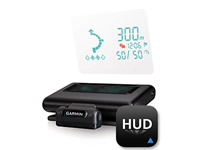
Part Number: HUD+ (Head-Up Display)
Description
Keep Your Eyes Ahead
Garmin HUD+ beams navigation information onto your windshield for easy viewing while driving. It receives data wirelessly from your compatible smartphone running the free Garmin HUD app.
The device offers far more navigation detail than other portable HUD systems, displaying turn indicators, distance to your next turn, current speed and speed limit, and estimated time of arrival. HUD+ lets you know what lane to be in for your next maneuver, as well as alerts you if you exceed the speed limit. With an in-app purchase, HUD+ can even warn you of potential traffic delays.
Set Up and Start Navigating
Using HUD+ is simple. Just apply the transparent film on your windshield (or attach the included reflector lens) and place the device onto your vehicle’s dashboard. Using your compatible iPhone®, Android™ phone, or Windows Phone®, download the free Garmin HUD app and follow the instruction to pair it with HUD+ using Bluetooth. Once paired, you can enter your destination on your phone and HUD+ will offer turn-by-turn directions to get you there. An integrated USB port on the vehicle power/adapter cable allows you to charge your phone while you’re on the go.

